
System Design Fundamentals Every Developer Should Know
Most developers can build a feature. Far fewer can design a system that handles 10 million users, survives a database failure, and stays fast under load. System design is the skill that separates senior engineers from everyone else — and it is almost never taught in tutorials.
This guide covers the core concepts with real architecture decisions, trade-offs, and code. Not theory for its own sake — the things you actually need when designing production systems.
"Any fool can write code that a computer can understand. Good programmers write code that humans can understand. Great engineers design systems that survive reality." — paraphrased from Martin Fowler
1. The Building Blocks: What Every System Is Made Of
Before designing anything, you need to know the components available to you.
| Component | What it does | When to use it |
|---|---|---|
| Load Balancer | Distributes traffic across servers | Any system with multiple app instances |
| CDN | Serves static assets from edge nodes | Images, JS, CSS, video |
| Cache | Stores frequently accessed data in memory | Read-heavy workloads, expensive queries |
| Message Queue | Decouples producers from consumers | Async tasks, event-driven systems |
| Database | Persistent storage | Everything that needs to survive restarts |
| Search Engine | Full-text and faceted search | Product search, log analysis |
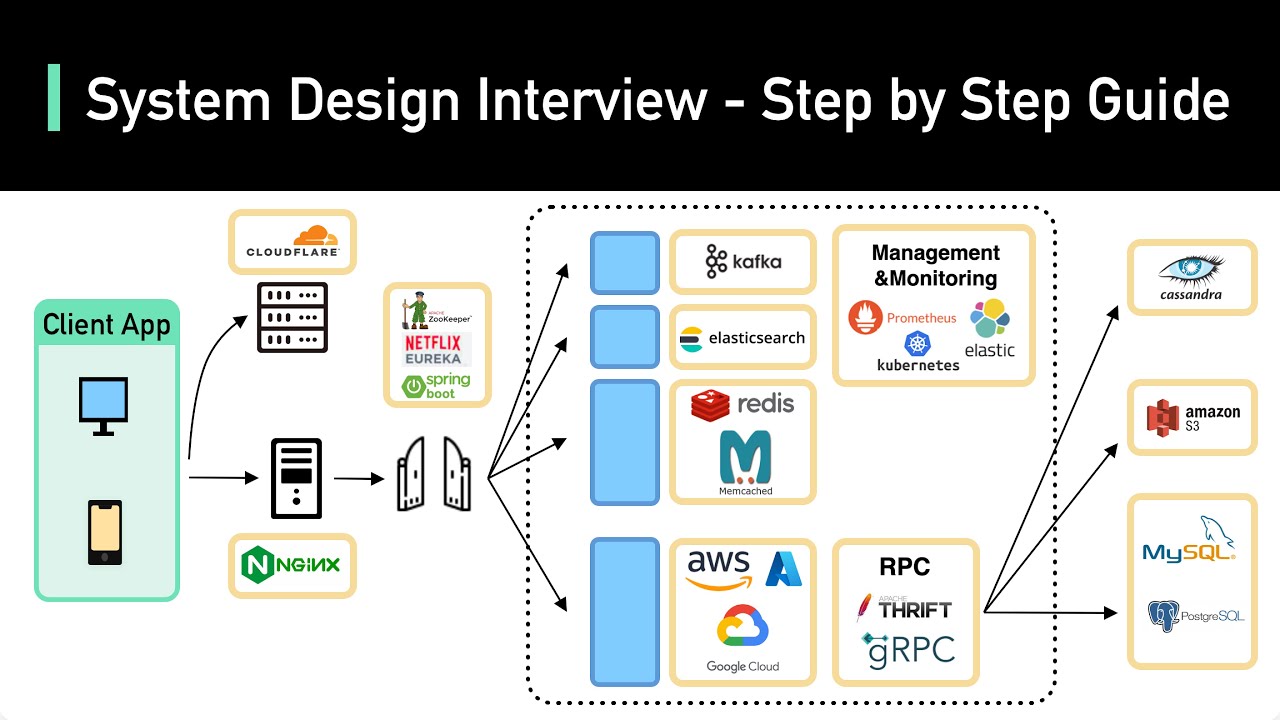
A typical production system looks like this:
Client
  ↓
CDN (static assets)
  ↓
Load Balancer (nginx / AWS ALB)
  ↓
App Servers (horizontal scale)
  ↓         ↓
Cache     Message Queue
(Redis)   (Kafka/SQS)
  ↓         ↓
Primary DB  Workers
(Postgres)
  ↓
Read Replicas
2. Horizontal vs Vertical Scaling
The first scaling decision you will face.
Vertical scaling — give the server more CPU, RAM, and disk. Simple, but has a hard ceiling and creates a single point of failure.
Horizontal scaling — add more servers. Theoretically unlimited, but requires your application to be stateless.
// Stateful server — CANNOT scale horizontally
// Session stored in memory — only works on one instance
app.post('/login', (req, res) => {
  const user = authenticate(req.body);
  req.session.userId = user.id;  // In-memory session
  res.json({ success: true });
});

// Stateless server — CAN scale horizontally
// Session stored in Redis — shared across all instances
import { Redis } from 'ioredis';
import { v4 as uuid } from 'uuid';

const redis = new Redis(process.env.REDIS_URL);

app.post('/login', async (req, res) => {
  const user = await authenticate(req.body);
  const sessionId = uuid();

  // Store session in Redis — accessible from any app instance
  await redis.setex(`session:${sessionId}`, 86400, JSON.stringify({
    userId: user.id,
    email: user.email,
    role: user.role,
  }));

  res.cookie('session_id', sessionId, { httpOnly: true, secure: true });
  res.json({ success: true });
});
3. Caching: The Biggest Performance Lever
Caching is the single most impactful optimization in distributed systems. A cache hit is 100-1000x faster than a database query.
Cache-Aside Pattern (Most Common)
import { Redis } from 'ioredis';
import { db } from './database';

const redis = new Redis(process.env.REDIS_URL);

async function getUserById(userId: string) {
  const cacheKey = `user:${userId}`;

  // 1. Check cache first
  const cached = await redis.get(cacheKey);
  if (cached) {
    return JSON.parse(cached); // Cache hit — ~0.1ms
  }

  // 2. Cache miss — query database (~10-50ms)
  const user = await db.users.findUnique({ where: { id: userId } });
  if (!user) return null;

  // 3. Store in cache with TTL
  await redis.setex(cacheKey, 3600, JSON.stringify(user)); // 1 hour TTL

  return user;
}

// Invalidate cache when data changes
async function updateUser(userId: string, data: Partial<User>) {
  const updated = await db.users.update({ where: { id: userId }, data });

  // Delete cache entry — next read will repopulate
  await redis.del(`user:${userId}`);

  return updated;
}
Cache Stampede Prevention
When a popular cache key expires, thousands of requests can hit the database simultaneously. Use a lock to prevent this.
async function getUserWithLock(userId: string) {
  const cacheKey = `user:${userId}`;
  const lockKey = `lock:user:${userId}`;

  const cached = await redis.get(cacheKey);
  if (cached) return JSON.parse(cached);

  // Try to acquire lock (expires in 5 seconds)
  const lockAcquired = await redis.set(lockKey, '1', 'EX', 5, 'NX');

  if (lockAcquired) {
    // We have the lock — fetch from DB and populate cache
    const user = await db.users.findUnique({ where: { id: userId } });
    await redis.setex(cacheKey, 3600, JSON.stringify(user));
    await redis.del(lockKey);
    return user;
  } else {
    // Another instance is fetching — wait and retry
    await new Promise(resolve => setTimeout(resolve, 100));
    return getUserWithLock(userId); // Retry
  }
}
4. Database Design: The Foundation
Your database schema is the hardest thing to change later. Get it right early.
Indexing Strategy
-- Without index: full table scan O(n)
-- With index: B-tree lookup O(log n)

-- Always index foreign keys
CREATE INDEX idx_orders_user_id ON orders(user_id);

-- Composite index for common query patterns
-- This index supports: WHERE status = ? AND created_at > ?
CREATE INDEX idx_orders_status_created ON orders(status, created_at DESC);

-- Partial index for filtered queries (much smaller, faster)
-- Only indexes active orders — not the millions of completed ones
CREATE INDEX idx_active_orders ON orders(user_id, created_at)
WHERE status = 'active';

-- Covering index — query satisfied entirely from index, no table lookup
CREATE INDEX idx_user_email_name ON users(email) INCLUDE (name, avatar_url);
Read Replicas for Scale
import { PrismaClient } from '@prisma/client';

// Primary: handles all writes
const primaryDb = new PrismaClient({
  datasources: { db: { url: process.env.DATABASE_PRIMARY_URL } },
});

// Replica: handles reads (can have multiple)
const replicaDb = new PrismaClient({
  datasources: { db: { url: process.env.DATABASE_REPLICA_URL } },
});

// Route reads to replica, writes to primary
async function getProducts(filters: ProductFilters) {
  return replicaDb.product.findMany({ where: filters }); // Read replica
}

async function createOrder(data: CreateOrderInput) {
  return primaryDb.order.create({ data }); // Primary
}
5. Message Queues: Decoupling for Resilience
When a user places an order, you need to: charge their card, send a confirmation email, update inventory, notify the warehouse, and record analytics. Doing all of this synchronously in the request handler is fragile — one failure blocks everything.
Message queues decouple these concerns.
// Producer: order service publishes an event
import { Kafka } from 'kafkajs';

const kafka = new Kafka({ brokers: [process.env.KAFKA_BROKER!] });
const producer = kafka.producer();

async function placeOrder(orderData: CreateOrderInput) {
  // 1. Save order to database (synchronous — user needs confirmation)
  const order = await db.orders.create({ data: orderData });

  // 2. Publish event — fire and forget
  await producer.send({
    topic: 'order.created',
    messages: [{
      key: order.id,
      value: JSON.stringify({
        orderId: order.id,
        userId: order.userId,
        items: order.items,
        total: order.total,
        timestamp: new Date().toISOString(),
      }),
    }],
  });

  // 3. Return immediately — don't wait for email, inventory, etc.
  return order;
}
// Consumer: email service subscribes independently
const consumer = kafka.consumer({ groupId: 'email-service' });

async function startEmailConsumer() {
  await consumer.subscribe({ topic: 'order.created', fromBeginning: false });

  await consumer.run({
    eachMessage: async ({ message }) => {
      const order = JSON.parse(message.value!.toString());

      try {
        await sendOrderConfirmationEmail(order);
        console.log(`Email sent for order ${order.orderId}`);
      } catch (error) {
        // Failed messages can be retried — the queue persists them
        console.error(`Email failed for order ${order.orderId}:`, error);
        throw error; // Kafka will retry
      }
    },
  });
}

// Inventory service subscribes to the same event independently
// Analytics service subscribes independently
// Warehouse service subscribes independently
// All decoupled — one failure doesn't affect the others
6. API Design: REST vs GraphQL vs tRPC
| REST | GraphQL | tRPC | |
|---|---|---|---|
| Best for | Public APIs, mobile clients | Complex data graphs, flexible queries | Full-stack TypeScript monorepos |
| Type safety | Manual (OpenAPI) | Schema-based | End-to-end automatic |
| Over-fetching | Common | Solved by design | Solved by design |
| Learning curve | Low | Medium | Low (if you know TypeScript) |
| Caching | Easy (HTTP cache) | Complex | Easy |
tRPC: End-to-End Type Safety
// server/routers/user.ts
import { z } from 'zod';
import { router, protectedProcedure, publicProcedure } from '../trpc';

export const userRouter = router({
  // Public query — no auth required
  getProfile: publicProcedure
    .input(z.object({ username: z.string() }))
    .query(async ({ input }) => {
      return db.users.findUnique({
        where: { username: input.username },
        select: { id: true, name: true, bio: true, avatar: true },
      });
    }),

  // Protected mutation — requires authentication
  updateProfile: protectedProcedure
    .input(z.object({
      name: z.string().min(1).max(100),
      bio: z.string().max(500).optional(),
    }))
    .mutation(async ({ input, ctx }) => {
      return db.users.update({
        where: { id: ctx.user.id },
        data: input,
      });
    }),
});

// client/components/Profile.tsx
// Zero boilerplate — types flow automatically from server to client
import { trpc } from '@/lib/trpc';

function ProfileEditor() {
  const { data: profile } = trpc.user.getProfile.useQuery({ username: 'vighnesh' });
  const updateProfile = trpc.user.updateProfile.useMutation();

  // profile.name is typed — TypeScript knows the exact shape
  // updateProfile.mutate() is typed — wrong input = compile error
  return (
    <form onSubmit={e => {
      e.preventDefault();
      updateProfile.mutate({ name: 'New Name', bio: 'Updated bio' });
    }}>
      <input defaultValue={profile?.name} name="name" />
      <button type="submit">Save</button>
    </form>
  );
}
7. The CAP Theorem: The Fundamental Trade-off
Every distributed system must choose two of three guarantees:
         Consistency
        (every read gets
        the latest write)
              /\
             /  \
            /    \
           /  CA  \
          /        \
         /----CP----|
        /     |     \
       /      |      \
      /   AP  |  CP   \
     /________|________\
Availability          Partition
(system stays up      Tolerance
during failures)      (survives
                      network splits)
- CP systems (MongoDB, HBase): Consistent and partition-tolerant. Will refuse requests rather than return stale data. Good for financial systems.
- AP systems (Cassandra, DynamoDB): Available and partition-tolerant. Will return potentially stale data rather than go down. Good for social feeds, shopping carts.
- CA systems (traditional RDBMS): Consistent and available. Cannot survive network partitions — only viable in single-node setups.
8. Rate Limiting at Scale
// Distributed rate limiting with Redis sliding window
import { Redis } from 'ioredis';

const redis = new Redis(process.env.REDIS_URL);

interface RateLimitResult {
  allowed: boolean;
  remaining: number;
  resetAt: number;
}

async function checkRateLimit(
  identifier: string,
  limit: number,
  windowSeconds: number
): Promise<RateLimitResult> {
  const now = Date.now();
  const windowStart = now - windowSeconds * 1000;
  const key = `ratelimit:${identifier}`;

  // Atomic Lua script — prevents race conditions
  const script = `
    local key = KEYS[1]
    local now = tonumber(ARGV[1])
    local window_start = tonumber(ARGV[2])
    local limit = tonumber(ARGV[3])
    local window_seconds = tonumber(ARGV[4])

    -- Remove expired entries
    redis.call('ZREMRANGEBYSCORE', key, '-inf', window_start)

    -- Count current requests in window
    local count = redis.call('ZCARD', key)

    if count < limit then
      -- Add current request
      redis.call('ZADD', key, now, now)
      redis.call('EXPIRE', key, window_seconds)
      return {1, limit - count - 1}
    else
      return {0, 0}
    end
  `;

  const result = await redis.eval(
    script, 1, key,
    now, windowStart, limit, windowSeconds
  ) as [number, number];

  return {
    allowed: result[0] === 1,
    remaining: result[1],
    resetAt: now + windowSeconds * 1000,
  };
}
9. Watch: System Design Interview Masterclass
10. Designing for Failure
The most important mindset shift in distributed systems: assume everything will fail. Servers crash. Networks partition. Databases go down. Disks fill up. Design for it.
// Retry with exponential backoff and jitter
async function withRetry<T>(
  fn: () => Promise<T>,
  maxAttempts = 3,
  baseDelayMs = 100
): Promise<T> {
  for (let attempt = 1; attempt <= maxAttempts; attempt++) {
    try {
      return await fn();
    } catch (error) {
      if (attempt === maxAttempts) throw error;

      // Exponential backoff with jitter
      const delay = baseDelayMs * Math.pow(2, attempt - 1);
      const jitter = Math.random() * delay * 0.1;
      await new Promise(resolve => setTimeout(resolve, delay + jitter));
    }
  }
  throw new Error('Unreachable');
}

// Usage
const user = await withRetry(() => externalUserService.getUser(userId));
The System Design Checklist
Before any architecture review, ask:
- Where are the single points of failure?
- What happens when the database goes down?
- How does this scale from 1,000 to 1,000,000 users?
- What is the read/write ratio? (Informs caching strategy)
- What consistency guarantees does the business actually need?
- What is the acceptable latency at p99?
- How do we monitor and alert when things go wrong?
System design is not about finding the perfect architecture. It is about making explicit trade-offs and being honest about what you are optimizing for.

Vighnesh Salunkhe
"Passionate about building scalable web applications and exploring the intersection of AI and human creativity."
Join the Conversation
Share your thoughts or ask a question